Sunday, March 27, 2022

Since the beginning of COVID, I have been doing Zoom presentations for radio clubs around the USA, Canada and UK. If your club is interested please email me.


tiny.cc/k8zt-p


Monday, May 11, 2020


ARRL FD and COVID-19 Social Distancing, What’s Your Plan?
I have a feeling that Field Day, the premier Summer Radio Activity for most Amateur Radio Clubs, is going to be a little different this year. With limits imposed by the COVID-19 precautions of Social Distancing and the higher risk populations present in most AR Clubs, club officers are scratching their collective heads to decide how they are going to do FD this year.

Traditionally FD was the event where many Hams were first exposed to HF operating, setting up antennas and stations, simplex SSB VHF (not FM repeater operation) and Contest style contacts. It is a time of fellowship and learning that is impossible to replace. But this year we may have to take a break from the normal mode of club-sponsored operations, but we do not have to skip operating FD.


I have put together a Slideshow Presentation- “Field Day in Social Distancing”. You can read through the presentation, share it with fellow club members and even have me present it to your club as an online meeting presentation. Here is the link - tiny.cc/fdsd.


Before We Go too Far, SAFETY FIRST!
●     By its nature Socially Distanced FD is a compromise in many ways with untested tools, equipment and plans
●     Thus, we need to be even more vigilant
○     Don’t Rush
○     Don’t Cut Corners
○     Don’t Go Near Overhead Wiring!!!!
○     Care when climbing, better yet avoid climbing when possible
○     Be careful with Generators
■     Gasoline, especially refueling
■     Carbon Monoxide fumes in enclosed spaces
Some of the highlights of the presentation:
●     What FD Classes are they and how does each adapt to Social Distancing
○     Class B solo or duo operations
○     Ideas for Class C mobile operations
○     Class D and E operations from your home
○     Using a vehicle to do a Class B operation with the advantages of the vehicle as a shelter and power source but with the advantage of larger, more efficient portable instead of mobile antennas
●     Operations for those without a station or even an HF radio at home
○     Remote operation of stations
■     Permanent (home) stations
■     Temporary field station (along the lines of a club set up Class A station)
○     Home VHF operations
○     Increased use of simplex FM
●     FD Options for Technician Licensees (Technician class Licensees have additional limitations due to operating privileges)
○     VHF Station 6 and/or 2 Meter
○     Satellite Contacts
○     10 Meter SSB
○     CW Only Operations on 80, 40 and/or 15 M (including ideas for those with little or no code proficiency- tiny.cc/fwm)
●     A call for local clubs and ARRL officials alike to encourage operation on less frequently used bands and modes to provide opportunities for Technician Licensees and newly licensed hams of all classes
○     Calling CQ on 10 Meters for local/regional contacts even during poor band conditions
○     2 Meter FM Simplex to provide local contacts
○     Slower speed CW opportunities at top of old Novice band CW allocations
●     FD Logging Software and help with setup and use

Another thought for FD this year-- consider getting younger family members at your house involved in your home or vehicle-based FD, but remember to keep safe with both Social Distancing and regular FD safety.

Here is the link to “Field Day in Social Distancing” - tiny.cc/fdsd. You can read through the presentation and please share it with fellow club members via your club’s newsletters, website and nets. If you are looking for an online meeting presentation, I would be happy to do this for you. If you prefer another talk here are seven I have been recently presenting remotely:
7.    Ideas & Resources for Growing Youth Involvement in Amateur Radio (based on my article in March 2020 CQ Magazine)
Recently, through these presentations, I have been able to meet club members around the state of Ohio that I never would have imagined I’d have an opportunity to speak to. It has been great and I am always looking for more opportunities to present (and I don’t limit to Ohio) so have your club program director contact me at k8zt@arrl.net. Visit my website www.k8zt.com for a wide variety of resources during this time of imposed isolation.

Wednesday, June 19, 2019

Having Fun with Morse, Getting Started with CW & Getting on HF Bands with Any License


The mode of Morse Code in Amateur Radio is commonly referred to as “continuous wave” or “CW”. (This name was chosen to distinguish it from the damped wave emissions from spark transmitters, not because the transmission is continuous.)

Morse Code, No Fun! Why?
Before 1990 all Amateur Radio licenses required at least some code and up until 2007 Code Proficiency was required to have most Voice HF radio privileges. It was something you had to do.
Many learned just enough to get their license but never used it on the air, they really just wanted voice privileges. Or worse yet, they got frustrated and lost interest in Amateur Radio. Now there is no code proficiency requirement for any level of Amateur Radio license.
Fun with Code- Maybe?
So the goal of this document is...
  • To get you on the HF bands as soon as possible.
  • To help you get on the air using code
  • To learn how it can be a fun and effective way to make contacts on HF
  • No testing or shaming of your code ability

Fun with Code- Yes!
Morse Code could be Fun and Useful:
  • Gets you on HF now!
  • More efficient in getting contacts than SSB (especially with QRP- low power)
  • Lower cost equipment & simple kits
  • A very popular contesting mode
  • No one knows how old you are, your gender or your accent
  • Doesn’t bother spouse or other nearby (with the shouting of voice contacts)
  • Did you realize you already have HF privileges with just a Tech License? Using CW- You Already Have HF Access!
    • You can use CW with your Tech License!
      • 80 meters    3.525 - 3.600 CW
      • 40 meters    7.025 – 7.125 CW
      • 15 meters  21.025 – 21.200 CW

Want to Work 6, 10 or 12 Meters But No Sunspots? Don’t Miss Your Chance with Summer E Skip and FT8.

You may have heard the doom and gloom about being in the depths of the 11 Year Sunspot Cycle:
  • “No propagation above 20 Meters”
  • “Ten is dead!”
  • “Might as well sell the radio”
  • “The sun will never return”
  • “It’s 80 & 160 Meters only for the next few years”
  • “#$@&%*!”


Well, the idea to concentrate on 160 and 80 Meters is a good idea, but not until late
fall or winter. In the meantime, there is a way to make contacts on 6, 10 or 12 Meters
most days of the week by taking advantage of the summer enhanced E Skip season
and the new mode of FT8.

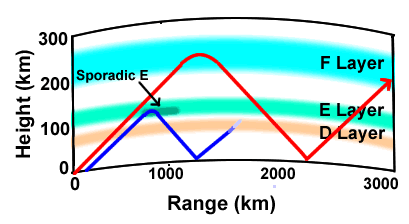
Typically during high sunspot activity (solar flux) ionization of the F layer of the
atmosphere facilitates refraction of signals on higher HF bands allowing
worldwide communications. The E layer is below the F layer and is responsible
for a propagation type known to abnormally effect VHF and higher HF frequencies
called Sporadic E or E skip.  This happens went ionized particles appear in the
E layer of the ionosphere. Sporadic E as the name implies occurs sporadically
throughout the year and is not dependent on 11-year sunspot cycle.
In the Northern hemisphere, sporadic E activities are more frequent during the
summer months.


Tuesday, April 30, 2019

FT4 a New Mode!

FT4 a new Digital Mode, similar to FT8 is here!
With even shorter transmissions (4.48 s, compared to 12.64 s for FT8), FT4 is designed for contesting.
Click here for details. Here is also a video of Joe Taylor announcing it- link. 
Download the software here (scroll down to Installation packages for WSJT-X 2.1.0-rc5)and get in on the inauguration of this new mode. 

Sunday, March 24, 2019

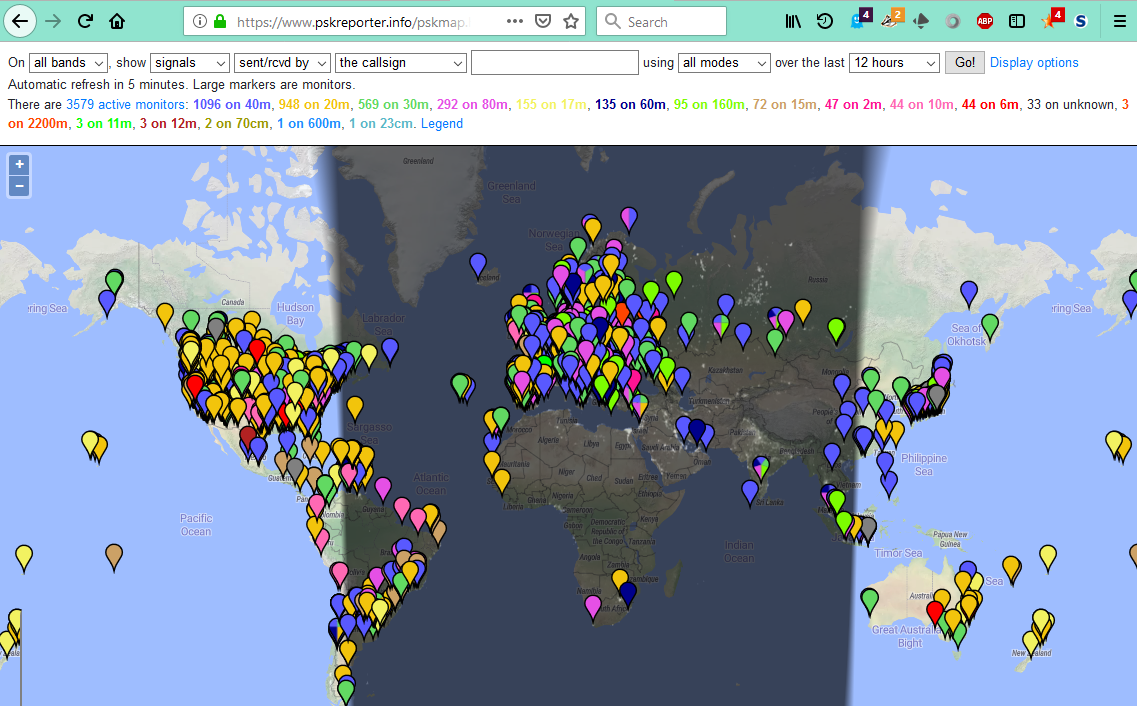
Using PSK Reporter Website as Propagation Tool

PSK Reporter, www.pskreporter.info/pskmap.html, is a powerful tool for monitoring your
FT8, JT65 or PSK signals around the world. But, even if you are not transmitting on any
of these modes it can still be a great propagation tool for determining which bands are
open and to where in the world signals from your area are being heard.


Here are some instructions with screenshots to get you started:
  1. Go to the PSK Reporter website- www.pskreporter.info/pskmap.html
  2. A map of the world will appear.

Don't Miss My Other Resources

  • K8ZT.com- connects all my sites & blogs, but focuses mainly on Amateur Radio, Cooking, Trains & Maps
  • ZTLearn.com- Resources for Students, Educators & anyone interested in learning something new.

If you are a new ham, just getting started on HF or looking to increase your country and state count this presentation is for you. Learn some Top Secret Techniques to WAS & DXCC. Includes tips for winning operating and contesting awards for the average ham.


Wednesday, February 20, 2019


Increase your Amateur Radio Fun by adding CW to your operating modes. I just put together a new presentation for a local licensing class and I am sharing it here for those that might be interested in getting started with CW. As usual, my presentation is more of a reference piece so it will stand on its own without me for you to read.

Wednesday, July 26, 2017

FT8 a New Mode!

Here is a chance to get in on the ground floor as a new mode rapidly gains popularity.
FT8, the newest digital mode from Noble Laurite K1JT, Joe Taylor. FT8 has been added to free WSJT-X suite that already includes JT65, JT9, MSK144 and more. For those familiar with very sensitive, but very slow contacts FT8 will seem very fast! FT8 involves a 15-second transmission versus JT65's one-minute transmissions. So contacts are 4 times faster but you do give up a few dB of sensitivity. For more details visit WSJT-X for Dummies & Experts

Thursday, April 13, 2017

I have recently added a number of DXing & DX News Resources for Amateur Radio at k8zt.com under "Operating" section. The link is www.k8zt.com/dx


I have recently added a number of Contesting & Calendar Resources for Amateur Radio at k8zt.com under "Operating" section. The link is www.k8zt.com/contesting


Saturday, April 1, 2017

Map Resource for Amateur Radio

I have recently added a number of Map Resources for Amateur Radio at k8zt.com under "Operating" section. The link is www.k8zt.com/maps.


Wednesday, March 22, 2017

Building a Clothespin Key

Even though proficiency with Morse Code is no longer required for getting an Amateur Radio license, young students often find code a fun activity. Fancy Code Keys can run in the hundreds of dollars and even a cheap plastic based “bargain” key is $12 to $20 each, even on eBay, and you have over 25 students!


The Clothespin Key was designed with price and durability in mind. In addition, it allows the students to assemble their own keys. Here is a typical price list:
As you can see, if you buy in bulk, you or your radio club could easily cover the cost for a class of 25 students by passing the hat at your next club meeting. You will notice the battery is over ½ of the cost for the key, so if you make it BYOB (bring your own battery) the keys can be under a dollar each.

Friday, January 13, 2017


K8ZT’s Contesting Companion
At the last meeting of my local radio club, the Cuyahoga Falls Amateur Radio Club (CFARC.org), I was asked if there were any upcoming contests, so this article is an attempt to answer that question. .


Contesting Site Links


  • Bruce Horn’s WA7BNM Contest Calendar- www.hornucopia.com/contestcal (probably the most comprehensive listing of contests anywhere).
  • ARRL Contest Calendar (a.k.a. Contest Corral)- ww.arrl.org/contest-calendar
  • Contesting.com - Contesting News, Articles, Surveys, Tips, Calendars & more!
  • SM3CER Contest Service- www.sk3bg.se/contest- contests, propogation, DX spots and more.

  • DL2NBY’s Ham Radio Contest Calendars - A somewhat overwhelming but very thorough collection of subscribable Google Calendars (CW, Phone, Digital Contest & Mixed).
  • 3830.com- a place for rumors, bragging, and summaries of current contests. You can upload your claimed score here to share with the world
  • The CQ Magazine Contests- Worldwide DX- PH, CW, RTTY & 160M; WPX- PH, CW & RTTY and DX Marathon (some of the most popular/larger contests).
  • NG3K Amateur Radio Contest/DX Page, www.ng3k.com, the place to find Announced DX Operations (ADXO) Stations that will be on during Contests plus a wide variety of other tools for Contesters and/or DXers.
  • State & Province QSO Party Calendar by N5NA- http://qsoparty.eqth.net


Contesting Anecdote-
Did you ever think about it- Amateur Radio Contesting 
is the only competition I can think of 
where you cannot score points unless
you provide your competitors with points!

Sunday, July 31, 2016

Monitoring Your JT65/JT6 Signal Around the World

Many of you are aware of the Reserve Beacon Network for gathering received CW signals from receiving stations around the world. This is then feed into spotting networks. This allows station that are not normally spotted to monitor their signal level from spots around the world.

PSK Reporter (www.pskreporter.info/pskmap.html) allows JT65/JT9 operators to do the same by displaying their received signal on a world map.


Saturday, July 30, 2016

JT65 Setup for Elecraft K3S

Elecraft K3S on JT65/JT9- Setting Up & Using
Link to this Doc- http://tiny.cc/K3S-WSJT-X
Installing and Setting Up Software
  1. Using Elecraft’s instructions, get the K3S rig control working using the USB connection. Check it using Elecraft K3 Utility and note the Com #
  2. Download and install the free WSJT-X software- http://physics.princeton.edu/pulsar/k1jt
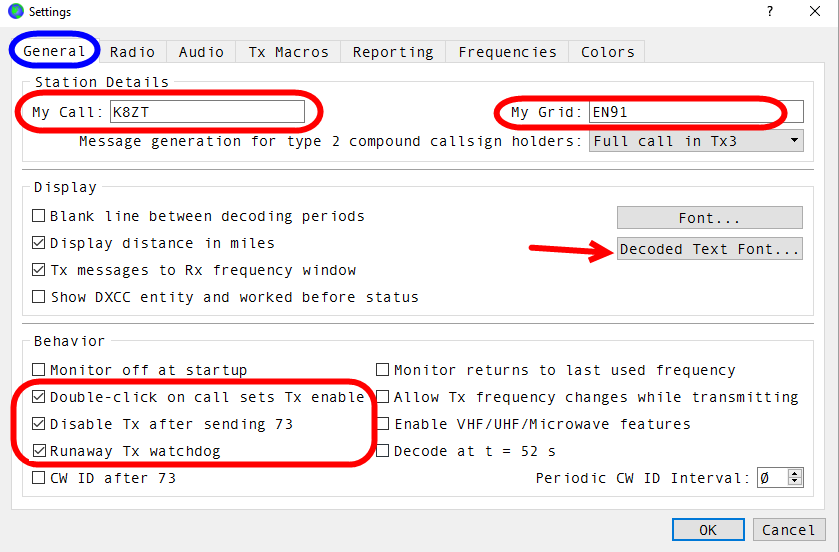
  3. Setup the WSJT-X software
    1. From top menu select.File...Settings
    2. Settings screen dialog box will open
  4. Start with General Tab

Thursday, July 21, 2016


An Interface for Elecraft KX3 & KX2 to Use with N1MM


This interface will allow you to:

  • Read the Elecraft KX3/KX2 frequency in N1MM
  • Control the radio’s frequency
  • Send CW by keying the radio

What you will need:

  1. N1MM+ software (free) - download here
  2. The Elecraft ACC-1 KXSER (3.5mm to DB9-F) Serial Interface Cable
    1. You can request this in place of the USB ACC1 cable that ships with KX3 (the same one you use for Firmware updates).
    2. If you did not choose to substitute serial for USB you can either purchase one from Elecraft ($29 + shipping)
    3. If you would like to build your own for ~$10 or even less if you have an old RS-232 cable or connector laying around. See circuit below, which also includes ability to directly key the radio.
  3. An RS-232 Serial to USB Adapter (although you can find very inexpensive versions, I strongly suggest you spend a few extra dollars to get a quality one. I have had excellent success with the StarTech ICUSB2321F, it has added advantage that will retain same Com Port # and not change each time you plug it into computer)

Using Elecraft KX3/K3 KY Codes to Allow N1MM & RTTY-FSK


A Step-by-step Guide (assuming no previous experience)
Anthony Luscre- K8ZT
Introduction
This guide has been written assuming you have had little or no experience with using KX3 USB Interface or N1MM operations. For those with previous knowledge fill free to skip ahead to needed configuration and sample Macros. There maybe other settings that work, but these worked for me.This setup should also work with K3 or K3S


Why?
  1. I wanted to use the KX3’s excellent FSK (not  AFSK) and KX3’s RTTY to Text Decoding
  2. I did not want to use a Signalink or other digi interface or use my computer’s sound card
  3. I was only interested in using RTTY for casual operation in a contest that required serial numbers and wanted to be able easily send reply with incrementing serial numbers
  4. A bonus is ability to also use this setup for SSB or CW (If you are interested in non-macro driven, direct keying CW see appendix)